


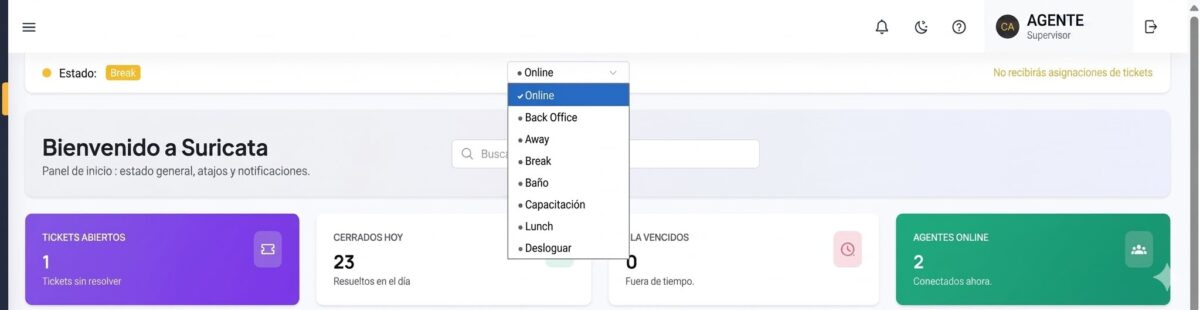
Another key feature of our platform helps you monitor agent availability.
? As part of the continuous improvements we make to Suricata AI, we have introduced an Agent Status system that allows agents to indicate their availability during working hours without logging out of the platform.
? The main advantage is that when an agent is, for example, in Away status, the system will not automatically assign tickets to them. However, the agent remains logged in and can still handle tickets manually whenever necessary.
Let’s take a closer look.
Available Statuses
? From the status selector on the main dashboard, agents can choose from the following options:
| Status | Description |
| Online | Active. Receives automatic ticket assignments. |
| Back Office | On internal tasks. No automatic ticket assignments. |
| Away | Unavailable. No automatic ticket assignments. |
| Break | On a break. No automatic ticket assignments. |
| Training | Attending training or a meeting. No automatic ticket assignments. |
| Lunch | Lunch break. No automatic ticket assignments. |
| Log Out | Ends the current session. |
ℹ️ As a general rule, any status other than Online suspends automatic ticket assignment.
⚠️ Please NOTE that all status changes must be made manually. The system never changes an agent’s status automatically—not even to switch to Away or back to Online. In other words, it is the agent’s responsibility to update their status whenever their availability changes.
? How Ticket Assignment Works
Let’s see how the system behaves depending on the agent’s status.
? When an agent is Online, they receive tickets automatically according to the configured assignment rules.
? When an agent is in any other status, the system does not assign tickets to them. Tickets that would otherwise have been assigned are redirected to the general support queue.
⚠️ The critical point is returning to Online status.
Remember that the system does not change an agent’s status automatically. When an agent returns from a break or any period of absence, they must manually switch their status back to Online.
Otherwise:
✅ The system will continue to treat them as unavailable.
✅ They will not receive automatic ticket assignments.
✅ They will continue to appear as unavailable in the Agent Status Report.
⚠️ This is the most common mistake: the agent is back at their workstation and actively working, but the system does not assign tickets because they forgot to change their status back to Online.
In our next newsletter we will explain how to interpret the Agent Status Report and make the most of its insights.
? If you’d like to learn more about Suricata AI, please don’t hesitate to contact us.
Diego Cúneo
Director de Meerkat Media & PR LAB
Periodista y comunicador con una trayectoria de más de 30 años en medios de comunicación masiva de primer nivel. Especialista en Comunicación Corporativa, Relaciones Públicas e Institucionales, con amplia labor en grandes empresas.