


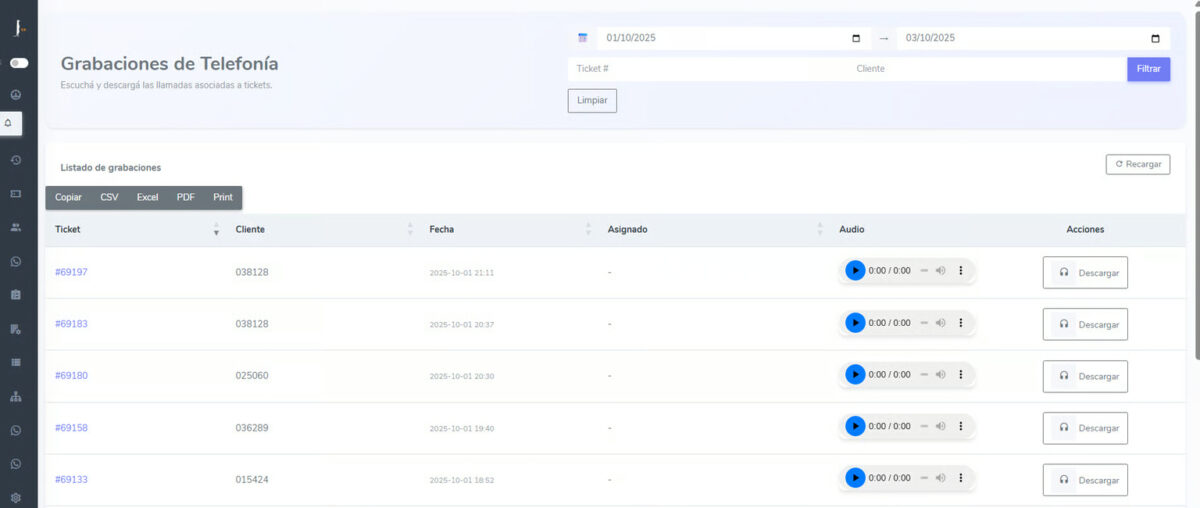
The improvements made to the platform now allow you to find them in the Dashboard
The latest of the updates we made to the functionalities of our tool Suricata Cx 3.0 is related to the possibility of accessing call recordings more quickly and easily.
What is the procedure? To access them, you need to go to the Audiotel tab where a detailed report of all call recordings made the previous day appears.
There, under Recording Search, the system allows you to filter and search for information easily through:
- Specific date (selecting a date range in the calendar).
- Ticket number.
- Customer number.
Once the filter is applied, a list will be displayed with all the recordings that meet those criteria. The list will show:
- Ticket → ticket number with direct access to its details.
- Customer → customer number associated with the call.
- Date and time → exact moment the call came in.
- Assigned → agent who handled the call (if applicable).
- Audio → integrated player to listen to the recording.
- Actions → option to download the recording.
In addition to viewing and downloading recordings individually, the system allows you to export the complete information in different formats, such as CSV, Excel, or PDF, or to print directly.
These changes aim to streamline and improve the efficiency of customer service management.
Therefore, if you want to know more about Suricata Cx 3.0, do not hesitate to contact us.

Martin Weidemann is a specialist in digital transformation, telecommunications, and customer experience, with more than 20 years leading technology projects in fintech, ISPs, and digital services across Latin America and the U.S. He has been a founder and advisor to startups, works actively with internet operators and technology companies, and writes from practical experience, not theory. At Suricata he shares clear analysis, real cases, and field learnings on how to scale operations, improve support, and make better technology decisions.