


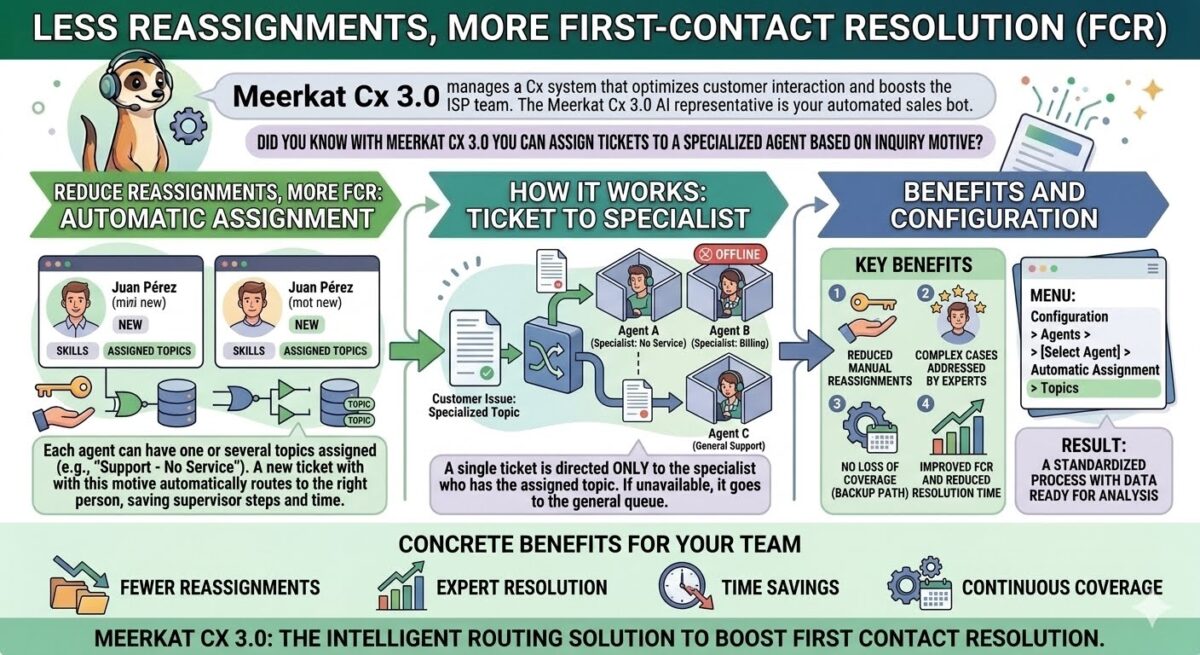
Did you know that with Meerkat Cx 3.0 you can automatically assign tickets to a specialized agent based on the customer’s reason for contact?
Fewer reassignments, more first-contact resolution. That’s the idea behind this feature in our omnichannel platform, Meerkat Cx 3.0: ensuring that specific tickets always reach the right agent—automatically, without manual intervention, and without wasting time reassigning cases from one person to another.
Let’s take a look how it works:
? One agent, one contact reason
? With Meerkat Cx 3.0, you can configure an agent to receive only the tickets associated with a specific contact reason, known as a topic. For example, if a ticket is submitted under “Support — No Service,” it will be routed exclusively to the agent assigned to that topic.
? The logic is simple: each agent can be assigned one or more topics. Whenever a ticket is created with one of those contact reasons, the system automatically routes it to the right person, without requiring a supervisor to intervene or manually reassign the case. This saves both time and unnecessary steps.
? The result: cases that require specialized attention go directly to the agent with the expertise to resolve them from the very first interaction.
✨ What if the specialized agent is unavailable?
? No problem. If the agent assigned to a topic is offline or unavailable, the ticket is automatically routed to the general department, where another agent can take ownership of it. This ensures that no customer request goes unanswered.
? What are the main benefits?
? Together, these capabilities deliver tangible improvements for your team:
- Fewer manual reassignments, since tickets reach the right destination from the start.
- Complex or sensitive cases are always handled by the agent with the most relevant expertise.
- Continuous coverage, even when a specialist is unavailable, thanks to the general workflow.
- Faster resolution times without the need to expand your team.
? Where can you configure it?
? Settings > Agents > Select an Agent > Automatic Assignment > Topics
⚡ As you can see, the key is making sure every ticket reaches the person best equipped to resolve it.
? If you’d like to review your team’s current assignment setup or need help defining your topics, please get in touch with us.
? And if you’d like to learn more about Meerkat Cx 3.0, please don’t hesitate to contact us.
Diego Cúneo
Director de Meerkat Media & PR LAB
Periodista y comunicador con una trayectoria de más de 30 años en medios de comunicación masiva de primer nivel. Especialista en Comunicación Corporativa, Relaciones Públicas e Institucionales, con amplia labor en grandes empresas.